JobFlo

The Privacy-First, On-Device AI Job Search Tracker

The local-first job search tracker designed to organize your application pipeline, prep for interviews with the STAR method, and beat US-based ATS systems — all without your data leaving your device.

Download on the App Store Download on the Mac App Store
🔔

Ghost Job Detection

JobFlo watches every open application automatically. A follow-up nudge appears at 14 days, a stale alert at 30, and a no-response flag at 45 — so nothing quietly disappears from your radar.

Follow up 14 days
Stale 30 days
No response 45 days
🎯

ATS Keyword Matching

⚙️ On-device · Privacy First

Ensure your resume aligns with the role. JobFlo's built-in scoring engine compares every application against ATS-friendly keywords and highlights the roles worth your energy — calculated entirely on your device.

🔥

Goal Streaks & Badges

Set a weekly application target and build a streak week over week. Hit milestones — 5 applications, 10, 25, 50 and beyond — and unlock badges as you go. A small but satisfying reminder that momentum compounds.

🎓

Interview Prep Hub

⭐ Pro & Premium

A dedicated space to prepare for every interview — per company, per round. Write and store STAR method answers, add company research notes, and build your list of questions to ask the interviewer. Your prep library lives on your device and grows with every application.

The Barlow Code

We don't even know you exist.

JobFlo is built on a simple principle: your data belongs to you. Not us. Named after John Perry Barlow — who believed the internet should remain free, open, and ungoverned — the Barlow Code is the privacy philosophy behind everything we build.

🔒

Local Processing

Every calculation — job match scoring, ghost job detection, streak tracking — runs entirely on your device. Nothing is sent to a server to be processed. No cloud inference. No data pipeline. Just your phone, doing the work.

🚫

No Third-Party Data Sharing

There are no third-party analytics SDKs, no tracking pixels, no data brokers embedded in JobFlo. Any anonymised usage signals are sent only to our own self-hosted analytics server — never to a third-party platform. Your job application data, notes, and salary figures never leave your device.

☁️

Trustless Syncing

Sync between your iPhone and Mac happens through iCloud — a direct device-to-device channel. We never see your data in transit. We can't. The sync architecture is trustless by design: it works without us having to be involved at all.

🗂️

Total Ownership

Your jobs, notes, analytics, and settings live in SwiftData on your own device. Export everything as a spreadsheet, delete it all with one tap, or walk away entirely. Your data doesn't disappear when you unsubscribe — because we never held it to begin with.

Named after John Perry Barlow (1947–2018), author of A Declaration of the Independence of Cyberspace.

Pricing

Simple, honest pricing.

Core features are free — always. Unlock more power when you need it.

Free
$0
forever
  • ✓ Job tracking (up to 20 applications)
  • ✓ iCloud sync — iPhone & Mac
  • — Interview Prep Hub
  • ✓ Vibe Check-ins
  • ✓ Ghost job detection
  • ✓ Goal streaks & badges
  • — Unlimited applications
  • — Full analytics & funnel view
  • — Kanban board
  • — Smart follow-up reminders
  • — Resume vault
  • — Bulk actions
Download Free
Most Popular
Pro
$4.99/mo
or $39.99/yr · save 33%
  • ✓ Everything in Free
  • ✓ Unlimited applications
  • ✓ Interview Prep Hub
  • ✓ Full analytics & funnel view
  • ✓ Kanban board
  • ✓ Smart follow-up reminders
  • ✓ Resume vault (3 versions)
  • ✓ Bulk actions
  • — Unlimited resume versions
  • — Priority support
  • — Early access to new features
Upgrade to Pro
Premium
$9.99/mo
or $79.99/yr · save 33%
  • ✓ Everything in Pro
  • ✓ Unlimited resume versions
  • ✓ Priority support
  • ✓ Early access to new features
Upgrade to Premium

Subscriptions managed via your Apple ID. Cancel anytime in App Store settings. Free tier has no time limit.

From the App Store

★★★★★

"JobFlo is the only one that stuck."

I've tried dozens of job tracker apps… It's intuitive, clean, fast, and practical. The iPhone and Mac support is a big part of why I like it. For anyone trying to stay organized instead of relying on spreadsheets, JobFlo is absolutely worth trying.

— stlmusic11

Have a bug? Got an idea?

Every little bit helps make this app better!

Upload Screenshot (optional)

Click to upload or drag and drop files here

PNG, JPG, GIF, WebP or PDF

Job Search Strategy

The Strategic Job Hunting Guide

Most job seekers apply in the dark — no system, no signal, no strategy. Jobflo changes that. Here's how a structured, privacy-first job search tracker turns chaos into a disciplined pipeline that actually gets results.

Why Spreadsheets Fail Your Job Hunt

A Google Sheet feels like a plan. It rarely is. When you're deep into a job search — juggling a dozen open roles, three screening calls, and a take-home project — manual tracking falls apart fast. Rows go stale, follow-up dates get missed, and you lose track of which salary expectation you quoted to which recruiter.

No automatic follow-up reminders

A spreadsheet won't nudge you when a promising role goes cold at 14, 30, or 45 days. Jobflo does — automatically, on device, with zero configuration.

📊
No pipeline visibility

Spreadsheets can't show you a Kanban board, a conversion funnel, or an alluvial flow of where every application stands in real time. Jobflo does all three.

🔐
Your data in someone else's cloud

Google Sheets, Notion, and Airtable sync your job search data to third-party servers. Your salary expectations, target companies, and recruiter notes are not private. Jobflo stores everything locally — on your iPhone or Mac only.

💸
Subscription fatigue from cloud trackers

Cloud-based job trackers charge recurring monthly fees for features that should be free. Jobflo is different — core features like iCloud sync and job tracking are completely free for every user. Pro unlocks Interview Prep Hub, unlimited applications, advanced analytics, Kanban, and more. No data hostage, no paywalled essentials.

Cracking the ATS and Interview Prep

Most US employers route every application through an Applicant Tracking System before a human ever sees it. That means your resume needs to match the job description's keyword density — not just reflect your experience in general terms. Jobflo's on-device ATS keyword matching engine compares each application against the posting and surfaces the gap, so you know exactly where to sharpen your resume before you hit send on platforms like LinkedIn, Indeed, and Glassdoor.

STAR Method

Turn your interview prep into a competitive edge

The STAR method — Situation, Task, Action, Result — is the behavioral interview framework used at Google, Amazon, Meta, and most Fortune 500 companies. In Jobflo, every interview round has a dedicated notes field where you draft and store your STAR-format responses per company. Over time, you build a personal library of achievement stories, sorted by company and stage, ready to pull up the morning of any interview.

S

Situation

T

Task

A

Action

R

Result

Jobflo also supports USD salary tracking on every application card — log your expected compensation, compare offers side by side, and walk into every negotiation knowing your number. Built for the US job market, where total compensation transparency on sites like Levels.fyi and Glassdoor can make or break a negotiation.

Spotting Ghost Jobs Before They Waste Your Time

Ghost jobs are a well-documented problem in the US job market: postings that are perpetually live, companies hiring without urgency, or roles already filled internally. They inflate application counts while burning out candidates. Jobflo's three-tier alert system is your early warning radar — tracking every active application automatically so nothing silently disappears from your radar.

14 Days — Follow Up

A follow-up badge appears on the application card. This is your cue to send a brief, professional check-in to the recruiter or hiring manager. Most hiring timelines are defined by this window.

30 Days — Stale

The application is escalated to stale. Most active US hiring processes resolve or communicate within 30 days. Silence beyond this point is a strong signal.

45 Days — No Response

Flag it as a ghost job and redirect your energy. Your time and attention are finite — they belong on roles at companies that communicate. Jobflo makes it easy to mark, archive, and move on.

Ghost job detection runs entirely on your device — no server calls, no background data collection, no subscription required. It's one more reason professionals who value their privacy choose Jobflo over cloud-based job hunting tools.

Ready to run a smarter job search?

Download Jobflo — the privacy-first job search tracker for iOS and Mac.

How to use JobFlo

Everything you need to get the most from your job search.

Tap the + button (top-right on iOS, or the toolbar on macOS) to log a new application. Fill in the company name, job title, and pick a status — use Wishlist for roles you're eyeing, or Applied if you've already sent your CV. Add salary, location, a deadline, or a link to the posting — all optional, but useful later.

Open any job and tap its current status badge to cycle through stages: Wishlist → Applied → Screening → Interview → Offer → Accepted (or Rejected/Withdrawn at any point). On iOS you can also swipe left on a card for quick actions. On macOS, click the status pill in the detail panel to update it instantly.

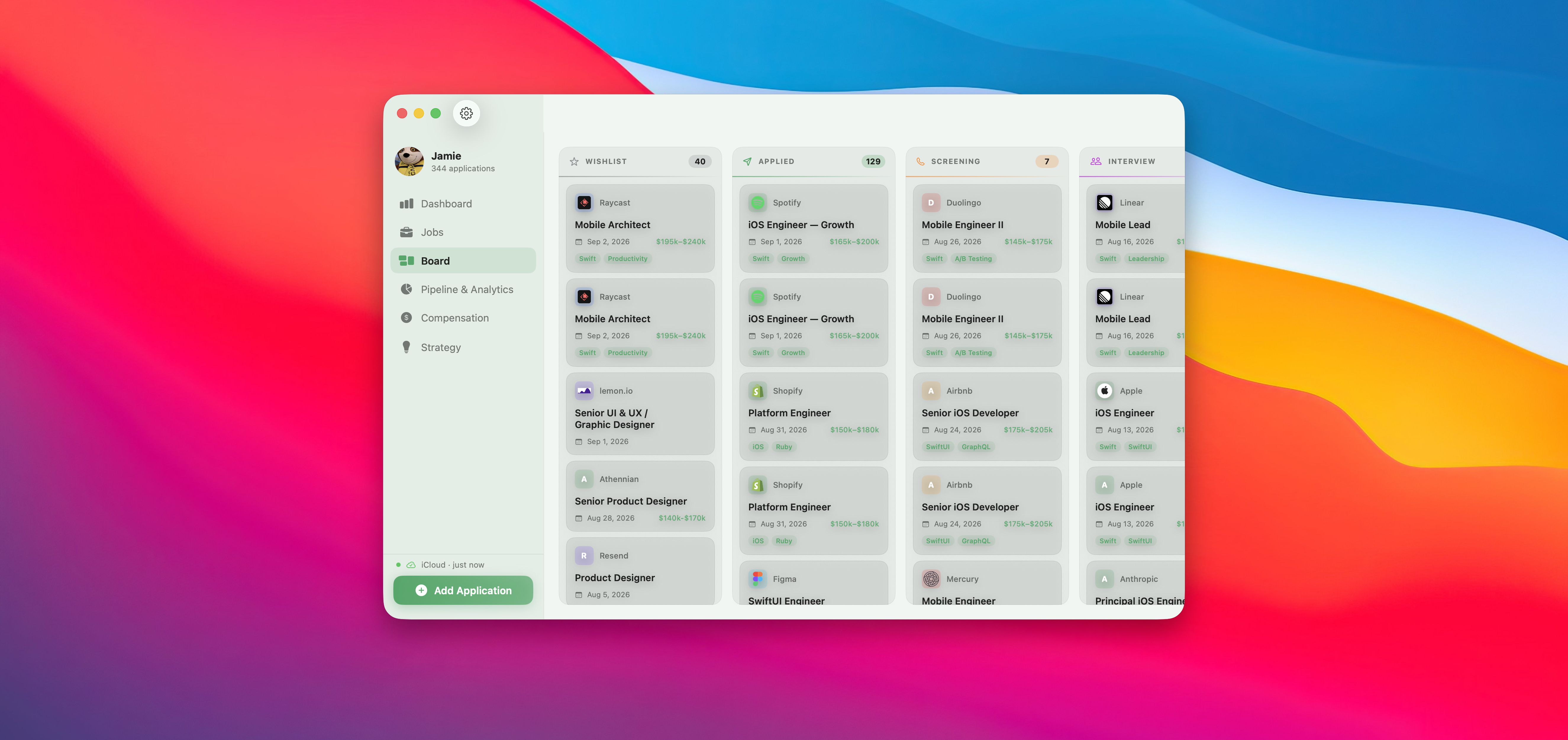
Switch to Board view using the grid icon in the top-right toolbar (iOS) or the Board tab (macOS). Each column represents a stage. Drag a card from one column to another to instantly update the job's status — no tapping into the detail screen needed. Great for a weekly review session when you want to sweep everything at once.

After adding a job or completing an interview round, JobFlo will prompt you to log your gut feeling: 🔥 hot (excited), 😐 meh (neutral), or 💀 dead (not feeling it). You can also set a vibe at any time from the job detail page. The Analytics screen tracks how well your instincts predict actual outcomes — over time you'll learn whether your gut is calibrated.

Once a job reaches Interview status, open it and scroll to the Interview Rounds section. Tap Add Round to log each stage — Phone Screen, Technical, Take-home, Panel, Final, etc. For each round you can record the outcome (Passed, Failed, Awaiting) and a vibe. JobFlo flags rounds where your vibe and outcome don't match — useful data for spotting companies that send mixed signals.

The Interview Prep Hub is a dedicated space to prepare for every interview — included in Pro and Premium. Access it from the job detail page or the dedicated Prep tab. For each application you can write and save STAR method answers (Situation, Task, Action, Result) per round, add company research notes — culture, recent news, the tech stack — and build a list of questions to ask the interviewer. Everything is stored locally on your device. The morning of an interview, open the hub for that company and you have your full prep brief right there.

On any job's detail page you'll find a Multiplier Skills section. Add skills that make you a particularly strong candidate for that specific role — things like "system design" or "their tech stack". This acts as a quick-reference prep list before interviews and helps you articulate your fit clearly when talking to recruiters.

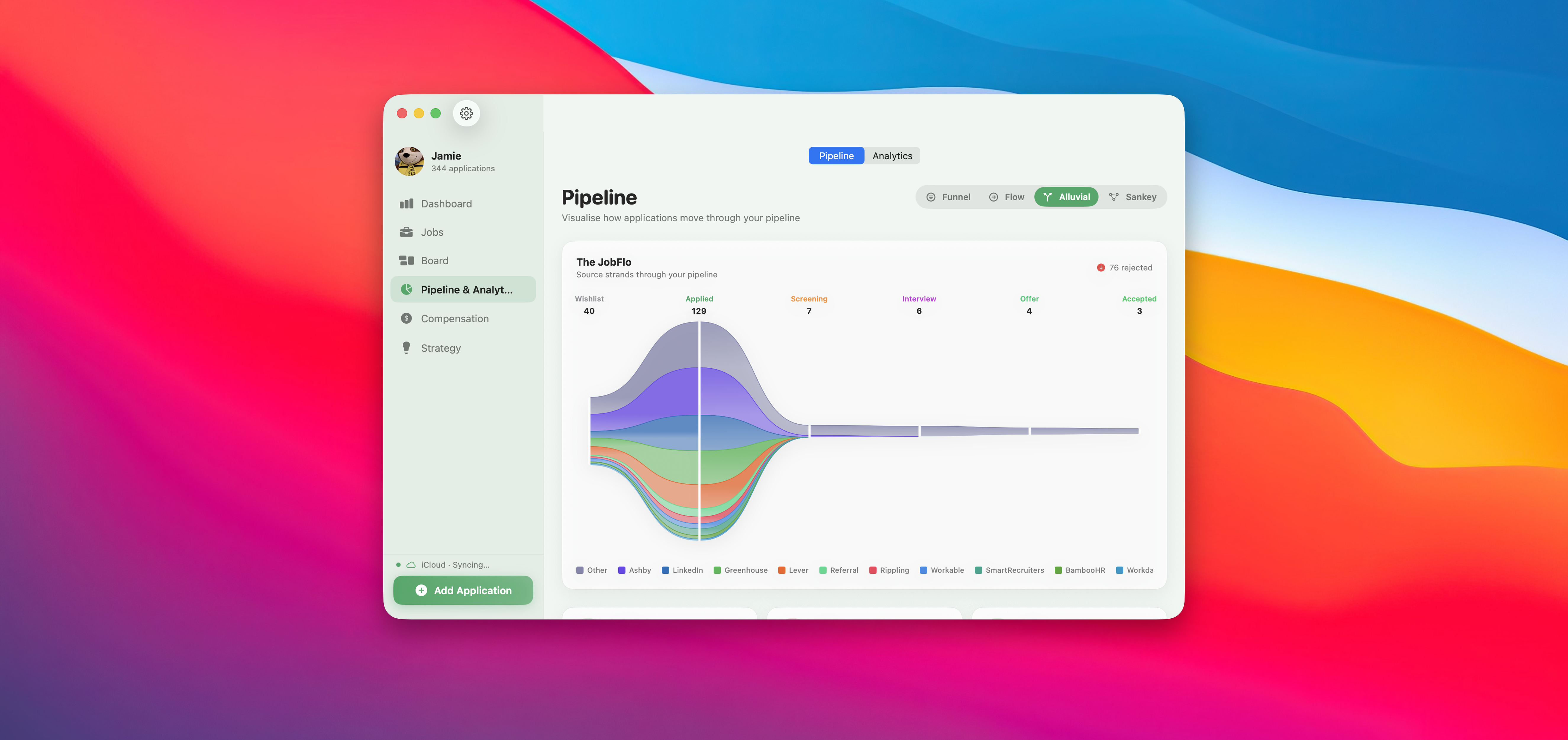
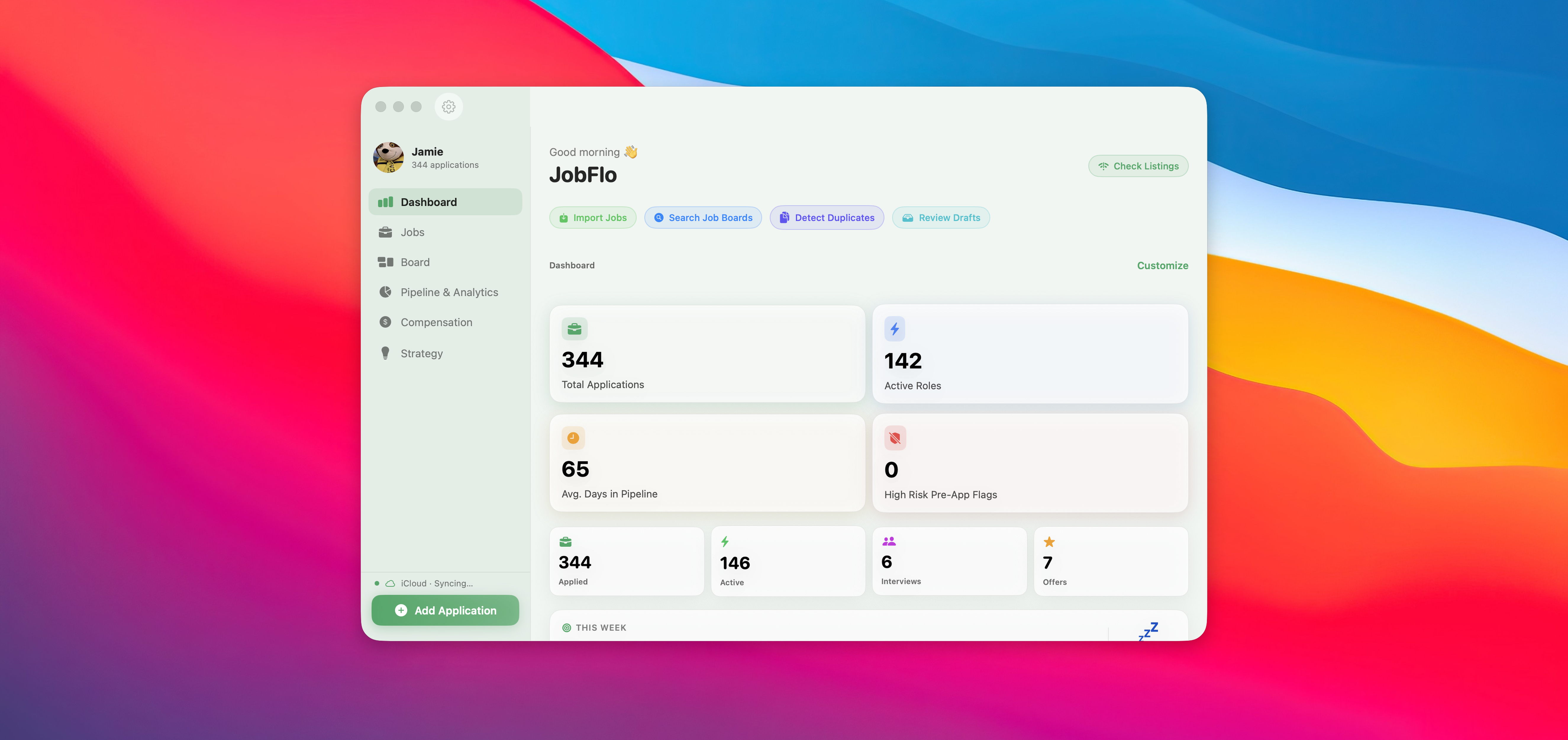
The Analytics tab turns your applications into actionable data. On iOS you'll see a pipeline funnel, response rate, callback rate, weekly application pace, and vibe accuracy. On macOS, switch between Funnel, Alluvial, Flow, and Sankey visualisations to see exactly which stages your applications advance through — and where they drop off. Use this to focus energy where it actually converts.

Go to Settings → Goal and set your target role, ideal salary, and key skills. JobFlo's built-in scoring engine compares every application against your goal and surfaces a match score on each job card — so you can immediately see which roles are most aligned with where you want to land. Everything is calculated on your device; no data is sent anywhere. This is especially useful when you're applying broadly and need a signal to decide where to focus your interview prep.

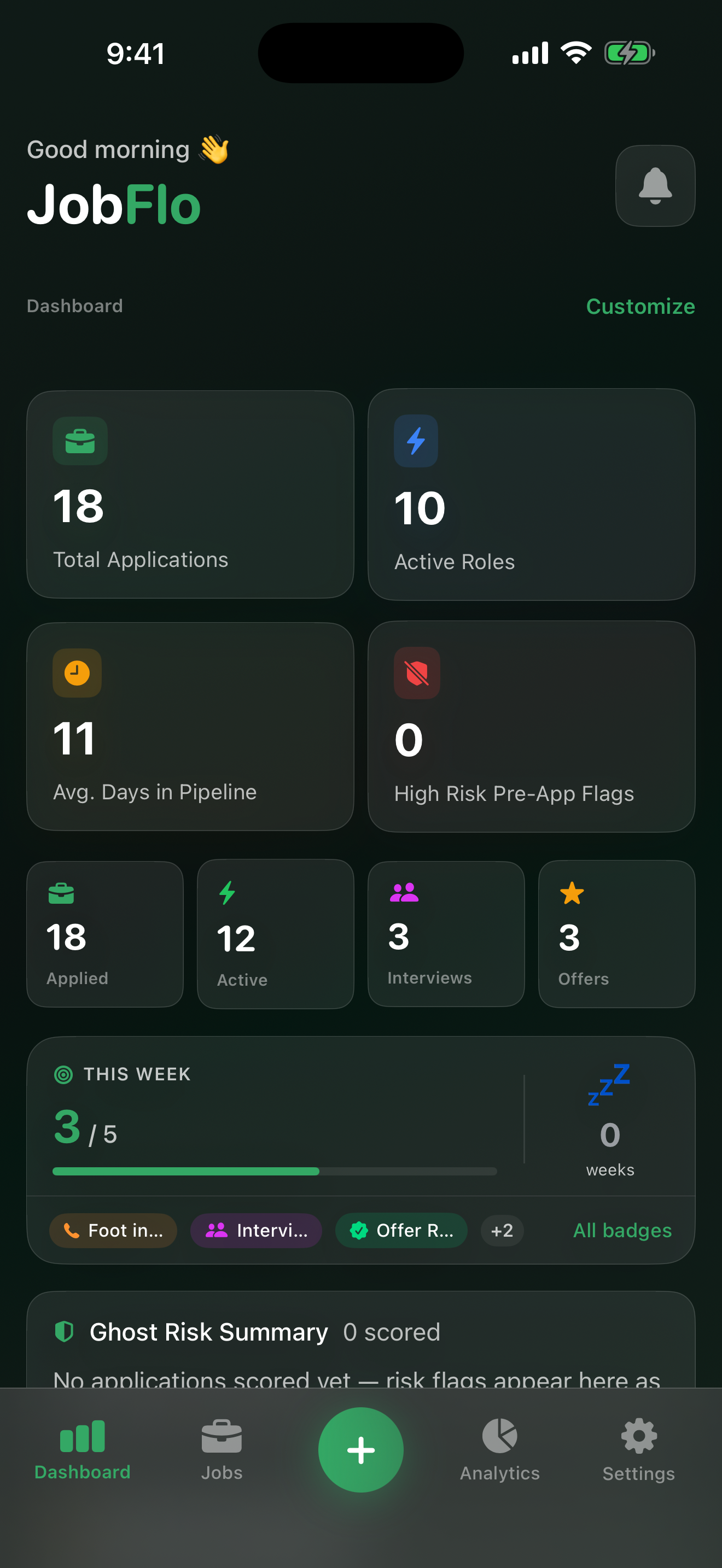
JobFlo automatically watches every application in Applied, Screening, or Interview status. If you haven't logged any activity after 14 days, a Follow up badge appears on the card — a nudge to chase the recruiter. At 30 days it escalates to Stale, and at 45 days the card is flagged as No response. These alerts are calculated from the last time you updated the job, so closing out a round or logging a note resets the clock. Applications in Wishlist, Offer, Accepted, Rejected, or Withdrew status are excluded — only roles where you're actively waiting for a response are monitored.

JobFlo syncs automatically via iCloud — no setup required. Make sure both devices are signed in to the same Apple ID and have iCloud Drive enabled in Settings. Changes you make on iPhone appear on Mac within seconds, and vice versa. There's no manual sync button; it just works in the background. If data seems slow to appear, pulling down on the jobs list triggers a refresh.

Go to Settings → Weekly Goal to set how many applications you want to log each week. The goal progress card on the home screen shows your count against the target and a progress bar that fills as you go. Hit your goal every week and your streak counter climbs — shown as 🔥 weeks on a streak, or 💤 if you missed a week. As your total application count and streak length grow, you'll unlock milestone badges — tap "All badges" on the goal card to see which ones you've earned and which are still locked. There's no AI or external service involved; it's all calculated locally from your own application data.

Go to Settings → Import and select your CSV file. JobFlo works with exports from Teal, Notion, Google Sheets, and Excel. Column mapping is handled automatically for common field names. After the preview looks right, tap Import — all jobs will appear in your list immediately. Your existing jobs won't be overwritten; imports are additive.

Open Settings → Appearance to choose your accent colour, glass intensity, colour temperature, and animation style. Under Accessibility, full colour blind mode support covers Deuteranopia, Protanopia, Tritanopia, and Monochromacy — plus high contrast, reduced transparency, reduced motion, and text size controls. Every setting takes effect immediately with no restart needed.